How to Make a Birthday Rap Video with a Personal Message
Write a short birthday rap for a friend, choose a photo and make a video greeting. Includes original verse examples and a birthday template demo.
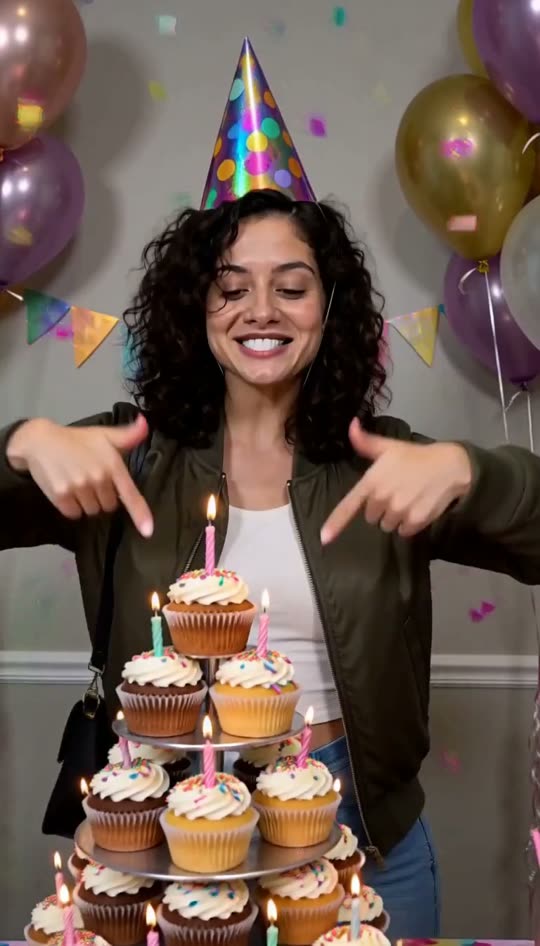
A personal birthday rap needs less information than a birthday speech: a name, one shared detail and a warm ending. The Birthday Rap template turns a photo and a short verse into an eight-second AI video with a party scene.
See the birthday scene
This sample has an AI-generated face. The preset asks for a party hat, cupcakes, balloons, confetti and an upbeat beat. It is a generated greeting, not a recording of the person in your photo performing at a party.
Write a message that fits
Try this structure: name or greeting + one familiar detail + birthday wish. Keep the result within 160 characters, ideally around 12 to 20 words. Longer names and complicated references can be harder to deliver clearly.
For a friend who is always late:
Happy birthday Jamie, last to every date, saved a slice of cake because you're always worth the wait.
For someone who loves coffee:
Another year of coffee, another year of cheer, raise that giant mug, your birthday crew is here.
For a simple positive greeting:
Your day, your cake, your favorite crew, here's another year of good things finding you.
These examples are original. Swap in a detail the recipient would enjoy. Avoid a private story that would embarrass them when the clip is shared outside the group.
Whose photo should you use?
You can use your own portrait to deliver the greeting. That is often easier than asking the recipient to supply a photo for a surprise. If the recipient is the performer, get their permission first.
Use one adult face with even light and no sunglasses. The current service does not permit photos of minors. For an animal birthday, choose Pet Rap instead and write birthday-themed lyrics; the human birthday preset is not tuned for animal faces.
Turn the message into a video
- Open the Birthday Rap generator, where the birthday preset is already selected.
- Choose your portrait and enter the verse. Select a deep or bright generated voice.
- Review pricing and allowances, then sign in and purchase credits. There are no signup credits or free video trials.
- Generate the eight-second video for 100 credits. Wait for the result and listen before downloading.
- Send the MP4 with a short written greeting so the recipient knows who made it.
Check name pronunciation, the final word and the face animation. AI generation can miss a word or produce visual artifacts. A new attempt uses additional credits, and an upstream job that starts rendering is chargeable even if it fails. A job rejected before rendering starts returns its credits.
When the clip needs more context
Keep the video focused on the punchline and put the longer message in your chat or caption. The tool generates a short rap clip; it does not produce a full birthday song or let you record your own singing voice.
For a playful roast, read how to write a friendly diss verse. For photo selection and the complete workflow, see our AI rap video tutorial and main generator.