Christmas Rap Video Ideas: Original Lyrics and a Photo Tutorial
Make a short Christmas rap greeting from one photo. Four original lyric ideas, template choices, an example video and a practical walkthrough.
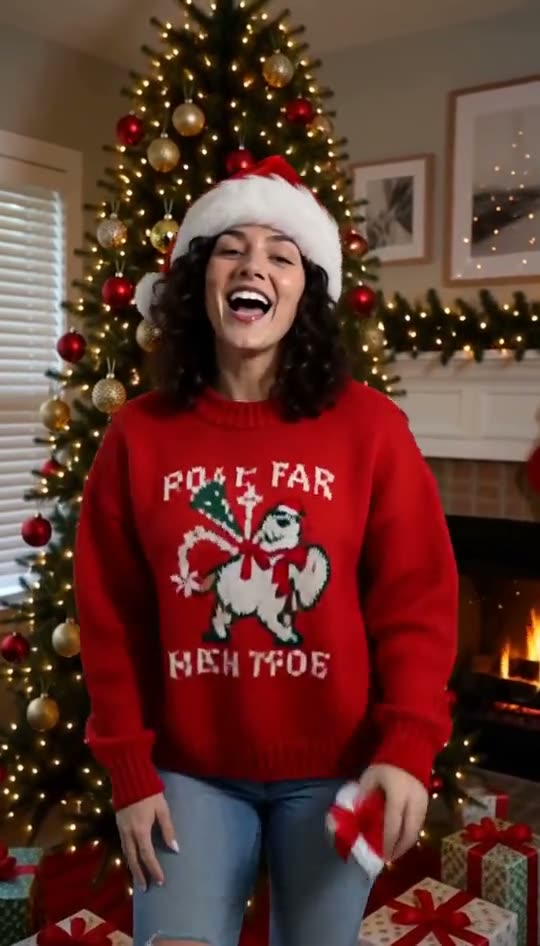
A Christmas rap greeting works best when it sounds like it belongs to your family or group chat. Start with one detail: someone always burns the cookies, the cat attacks the wrapping paper, or nobody agrees on the tree decorations. Turn that detail into two short lines instead of squeezing a whole song into one clip.
Watch the Christmas template
This is a generated demonstration with an AI-created face. The Christmas rap video maker uses a Santa hat, a red sweater, tree lights and a festive hip-hop beat. Your result will vary with the photo and lyrics; the sample is not a preview of your own finished video.
Four original Christmas rap verses
These examples are starting points for an eight-second greeting. Keep your final lyrics within the editor's 160-character limit, and aim for roughly 12 to 20 words. Delivery speed varies, so fewer words can make the ending easier to hear.
For the family chat
Cookies in the oven, everybody's running late, still the best crew gathered round the holiday plate.
Replace "cookies" with your family's actual tradition. One specific detail makes the greeting more personal than a list of holiday phrases.
For the friend who loves gifts
Wrapped it with a ribbon, put your name upon the tag, all I want for Christmas is a nap inside this bag.
For a cat
You bought all the presents, I just claimed the box, guarding every ribbon in my tiny Christmas socks.
For an animal photo, choose Pet Rap and add holiday lyrics. That preset is designed for an animal face; it does not automatically include the Christmas scene.
For the office group
Closed another spreadsheet, put the deadlines on a shelf, happy holidays team, save some cookies for yourself.
Use your own photo, or ask permission before using a colleague's. Keep workplace jokes friendly enough that the subject would enjoy receiving the clip.
Make the greeting step by step
- Open Christmas Rap. Watch the sample and check current pricing before purchasing.
- Choose a clear photo of one consenting adult, facing the camera. Leave room around the head for a hat and movement.
- Enter your short verse, or keep the preset lyrics. Select a deep or bright generated voice.
- Sign in and use purchased credits to generate. There is no free trial or signup credit; one eight-second generation uses 100 credits.
- When the job finishes, review the words, face and sound before downloading the MP4.
Generation can take longer than expected or fail. Once the upstream engine accepts and starts the job, the attempt uses credits even if the render fails. A rejection before rendering starts returns the credits.
Share a greeting, not a full Christmas song
The output is an eight-second rap video, not a complete song, karaoke track or a remake of a commercial recording. If you need a longer greeting, introduce the clip with your own written message. Play the downloaded file with sound once before sending it.
For a December birthday, use the Birthday Rap template to keep the cake-and-party scene. New to the whole workflow? Read how to make an AI rap video from one photo or return to the AI rap video generator.